Offsite is the new onsite. Capture more brand spend beyond your owned channels.

Get the playbook.

Content Cop

Your brand guideline guardian.

Streamline campaign reviews, filter inappropriate content & ensure brand consistency with AI content validation.

Trusted by leading retailers in 11 countries
"bigbasket, A TATA Enterprise" logo in white text
"TATA 1mg" logo in white text
"purplle" logo in bold white text
"firstcry.com" logo in white text
"snapmint" logo in white text with a leaf-like icon
"rapido" logo in dark text on a white oval background
"Apollo 24|7" logo in white text on a dark oval badge
"truemeds" logo in white text with a heart and lock icon
"smytten" logo in white text with three dots below
"AJIO" logo in bold white uppercase text
"BharatPe" logo in white text with a circular icon
"takealot.com" logo in white text with a blue circular icon
"Konga.com" logo in orange text with a swirl icon
"MR.D" logo in white on a dark rounded square
"Sharaf DG" logo in white text
"Pick n Pay" logo in white text
"bash" logo in bold white lowercase text
"Wakefern Food Corp" logo in bold white text
"GPA" logo in white text with a curved swoosh above it
"FairPrice Group, Every Day, Made A Little Better" logo in white text
"DFI Retail Group" logo in white text
"MR.DIY" logo in bold white letters
"bigbasket, A TATA Enterprise" logo in white text
"TATA 1mg" logo in white text
"purplle" logo in bold white text
"firstcry.com" logo in white text
"snapmint" logo in white text with a leaf-like icon
"rapido" logo in dark text on a white oval background
"Apollo 24|7" logo in white text on a dark oval badge
"truemeds" logo in white text with a heart and lock icon
"smytten" logo in white text with three dots below
"AJIO" logo in bold white uppercase text
"BharatPe" logo in white text with a circular icon
"takealot.com" logo in white text with a blue circular icon
"Konga.com" logo in orange text with a swirl icon
"MR.D" logo in white on a dark rounded square
"Sharaf DG" logo in white text
"Pick n Pay" logo in white text
"bash" logo in bold white lowercase text
"Wakefern Food Corp" logo in bold white text
"GPA" logo in white text with a curved swoosh above it
"FairPrice Group, Every Day, Made A Little Better" logo in white text
"DFI Retail Group" logo in white text
"MR.DIY" logo in bold white letters

What it does

More advertisers. Same review team.

Self-serve grows your advertiser base faster than any review team can. Sofie checks every creative against your guidelines and the campaign it runs in, then names each issue, so advertisers fix them before submitting and reviewers start with the creatives that need them.

Checked on submission.

Every creative is analysed automatically. No advertiser or reviewer has to trigger it.

Issue ranked by severity.

Critical, major and minor, on every creative and every channel.

Named to the asset and rule.

Each issue shows the element, where it sits, the rule version and the fix.

Fix and re-check in place.

Advertisers amend and re-run the check without rebuilding the campaign.

Your guidelines, as rules.

Upload your documents; approve every extracted rule before it goes live.

Every analysis on record.

Checks, rule version and decision, kept for every creative for audit.

See Content Cop in action.

Watch an upload get checked, explained and fixed before review.

Get a demo →

Fix before submit

Fixed before submission, not after rejection.

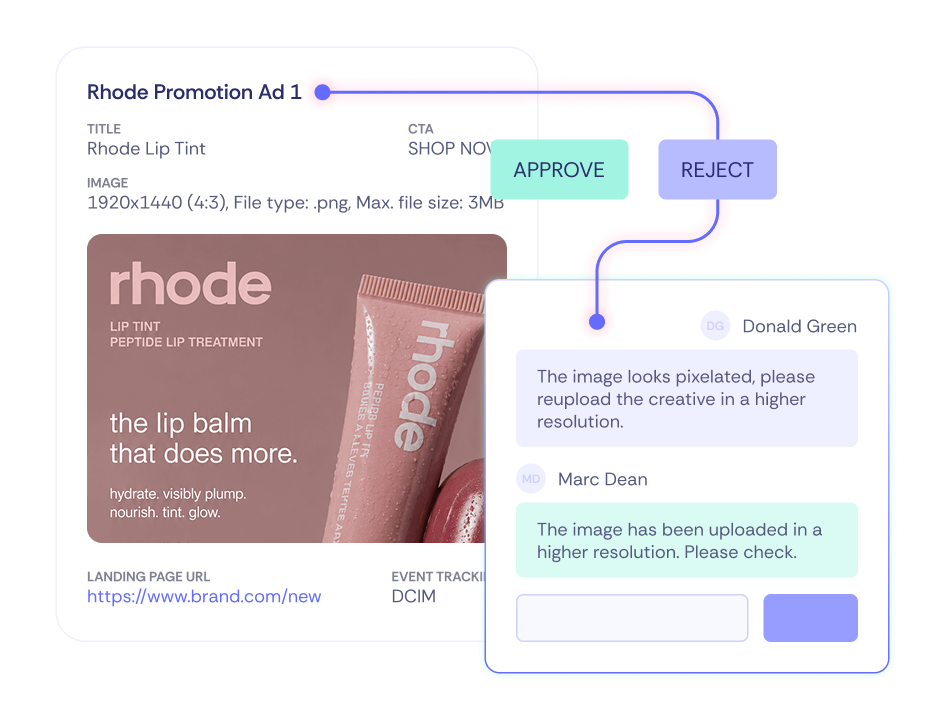
Advertisers see every issue the moment they upload. They fix it and re-check in place, without rebuilding the campaign or waiting in a queue to find out what went wrong.

Fix, not flag

Every element checked. Every fix made clear.

Content Cop reviews each part of a creative against your guidelines and shows exactly what to change. Advertisers fix issues on their own, and clean creatives reach approval faster.

One rulebook

Your rules and your campaign. Checked in one pass.

Upload the guidelines you already have. Sofie turns them into rules you review and approve, then applies them across Offsite, Onsite and Instore Digital channels.

SEE IT IN ACTION

See Content Cop in action.

Get a walkthrough of creative checks across Offsite, Sponsored Display and Instore Digital when we open access.

Thank you!

We’ll get back to you soon.

Oops! Something went wrong while submitting the form.

frequently asked questions

Your questions, answered.

Answers about how Content Cop fits into your review process.

What does Content Cop check?

Every upload is screened for format, dimensions, quality, inappropriate language and duplicated content, then scored against your brand and placement guidelines before it reaches a reviewer.

Does AI make the final approval?

No. AI screens and scores; your reviewers approve. You decide which steps run automatically and which need a person.

Can we set our own guidelines and approval steps?

Yes. Guidelines are set per format, and approval paths can run in parallel or in tiers, configured per team.

How do advertisers see feedback?

On their campaign. They see the comment, the suggested fix and the brand score, and reply from the same dashboard they used to submit.

Is the brand score a performance forecast?

No. It measures alignment with your guidelines. It is not a click-through or sales prediction.

How is Content Cop different from Creative Review?

Content Cop is the Sofie agent that screens and scores every creative against your guidelines. Creative Review is the approval workflow your reviewers work in.

How does it work with Creative Director?

Creative Director makes the creative; Content Cop checks it. Keeping the two separate means generated and uploaded creative pass the same checks.

When is Content Cop available?

It's coming soon. Talk to our experts to see it early and join the access list.